Sfoglia categorie
Esplora
Fiverr Pro
Italiano
$
USD

Level 1


Traduzione automatica.
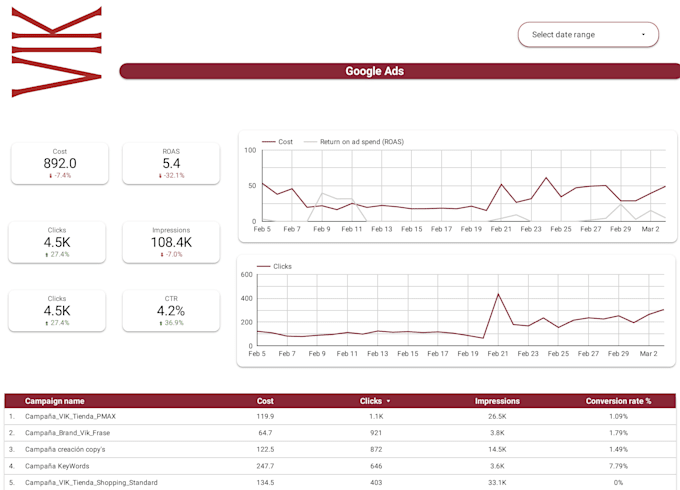
Stai sprecando ore a tirare manualmente rapporti Google Ads ogni settimana? Creerò una dashboard personalizzata di Google Data Studio (Looker Studio) che automatizza completamente il tuo reporting di Google Ads e mostra le tue prestazioni pubblicitarie complete in un report chiaro e aggiornato in tempo reale.
Cosa monitoro:
Fonti di dati:
️ Cosa ottieni:
Perfetto per gestori di Google Ads, agenzie PPC, marchi di ecommerce e marketer digitali.
Oltre 200 progetti e recensioni a 5 stelle: creo dashboard di Google Ads che ti fanno risparmiare ore ogni settimana.
Contattami prima di ordinare, controllerò il tuo account Google Ads e confermerò le fonti di dati. Risposta entro 1 ora!
Taking your Business to the Top
Level 1
Lingue
Traduzione automatica.
Traduzione automatica.
Puoi collegare direttamente il mio account Google Ads a Google Data Studio (Looker Studio)?
Sì. Collego il tuo account Google Ads direttamente a Google Data Studio usando il connettore nativo di Google. Questo crea una dashboard live e automatica che mostra tutti i dati di Google Ads in tempo reale, comprese campagne, gruppi di annunci, parole chiave, spese e conversioni, senza bisogno di esportazioni manuali.
Di cosa hai bisogno da me per iniziare a creare la dashboard di Google Data Studio per Google Ads?
Per iniziare ho bisogno di accesso in sola lettura al tuo account Google Ads, accesso a GA4 o Search Console se vuoi includerli, e una breve panoramica dei KPI più importanti per te. Contattami prima di ordinare e controllerò il tuo account, confermerò l'ambito e ti darò un piano di consegna chiaro.
Quali metriche di Google Ads puoi monitorare in Google Data Studio (Looker Studio)?
Posso monitorare tutte le metriche principali di Google Ads, tra cui spesa totale, impression, clic, CTR, CPC, conversioni, costo per conversione, ROAS, punteggio di qualità, performance delle campagne, suddivisione per gruppo di annunci e dati a livello di parola chiave.
Puoi combinare i dati di Google Ads e Google Analytics (GA4) in un unico dashboard?
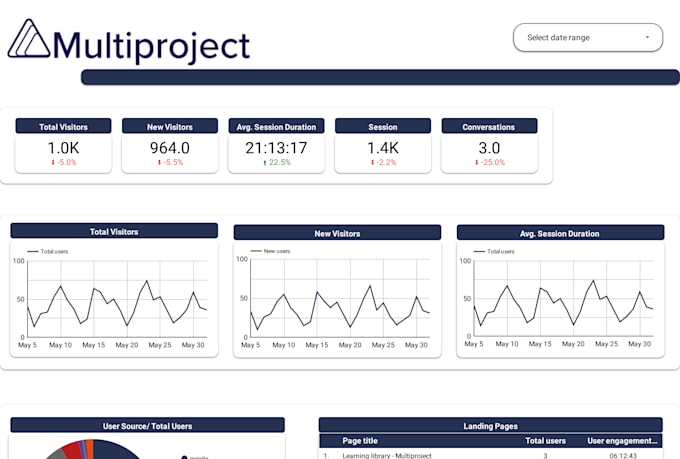
Sì. Sono specializzato nel combinare i dati di Google Ads con Google Analytics 4 (GA4) in un dashboard unificato di Google Data Studio (Looker Studio). Così puoi vedere il traffico a pagamento, il comportamento sul sito, i percorsi di conversione e il ROAS tutto in un report automatizzato che ti dà un quadro completo del ROI delle tue campagne Google Ads.
Puoi includere i dati di Search Console nella mia dashboard di Google Ads?
Sì. Posso aggiungere i dati di Google Search Console insieme a quelli di Google Ads per mostrare le performance sia a pagamento che organiche in una sola dashboard. È particolarmente utile per confrontare le performance delle parole chiave a pagamento e organiche e individuare eventuali lacune nella strategia di ricerca.
Puoi aggiungere Facebook Ads e altre piattaforme alla mia dashboard di Google Ads?
Sì. Posso integrare Google Ads con Facebook Ads, Instagram Ads, TikTok Ads, LinkedIn Ads e Microsoft Ads in una dashboard unificata di Google Data Studio. Questo ti dà una panoramica completa delle campagne a pagamento su più piattaforme, così puoi confrontare le performance e l'allocazione del budget tra tutti i canali pubblicitari.
La mia dashboard di Google Ads si aggiornerà automaticamente?
Sì. Il tuo dashboard di Google Data Studio (Looker Studio) si collega a Google Ads tramite un connettore nativo live e si aggiorna automaticamente. Vedrai sempre le ultime spese, clic e conversioni delle campagne senza dover aggiornare o esportare manualmente nessun report da Google Ads.
Puoi configurare email automatiche di report di Google Ads per il mio team o clienti?
Sì. Posso configurare il tuo dashboard di Google Data Studio (Looker Studio) per inviare report via email automatici programmati ogni giorno, settimana o mese. È perfetto per le agenzie PPC che devono consegnare report sulle performance di Google Ads ai clienti in modo automatico, senza lavoro manuale.
Puoi creare una dashboard di Google Ads per un'agenzia che gestisce più account?
Sì. Ho esperienza nella creazione di dashboard di Google Data Studio (Looker Studio) per agenzie PPC che gestiscono più account Google Ads. Posso creare report template che funzionano su diversi account clienti, rendendo il reporting di Google Ads rapido, coerente e completamente automatizzato.
Hai bisogno dell'accesso admin al mio account Google Ads?
No. Ho bisogno solo di accesso in modalità visualizzatore in sola lettura al tuo account Google Ads per creare la tua dashboard di Data Studio. Questa è un'autorizzazione sicura e limitata che non permette modifiche alle campagne, al budget o alle impostazioni. Ti guiderò su come condividere l'accesso prima di iniziare.