Sfoglia categorie
Italiano
$
USD
Connettiti alla tua IA

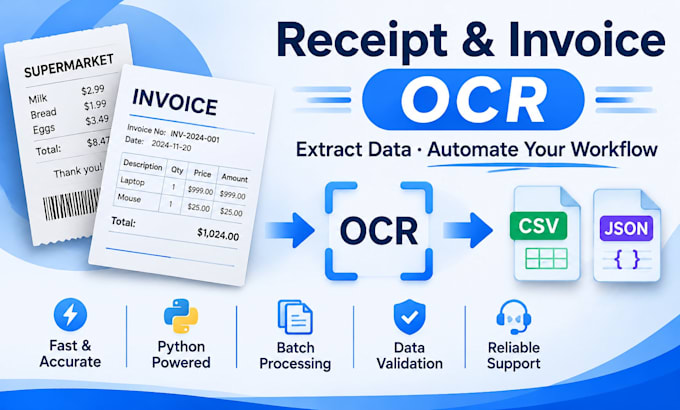
Need to extract data from receipts, invoices, or scanned documents?
I provide AI-assisted OCR and document data extraction services using Python, PaddleOCR, and local AI models.
What I can do:
- Extract text and structured data from PDF, JPG, JPEG, PNG, TIF, and TIFF files.
- Process multi-page PDFs and scanned documents.
- Extract important fields such as merchant names, dates, invoice numbers, totals, taxes, and item details.
- Organize extracted information into CSV or JSON files.
- Validate required fields, check data types, identify missing information, and detect potential duplicate records.
- Process multiple documents in batches and provide error reports for unsuccessful pages.
What you will receive:
- Structured CSV or JSON files.
- Extracted document information.
- Error reports for documents that need additional attention.
Why work with me?
I focus on practical Python automation, structured data, and reliable document processing. I will review important extracted information rather than simply sending you raw OCR results.
Please contact me
Python OCR
Lingue
Q: Can you process multiple documents at once?
Yes. The system supports batch processing and multi-page documents.
Q: Does the system use AI?
Yes. PaddleOCR extracts text, and Ollama-powered language models identify and organize the required fields.
Q: Is my document data sent to an external AI API?
The standard architecture uses locally hosted PaddleOCR and Ollama models. No external AI API is required by default.
Q: Can you extract custom fields?
Yes. Extraction fields can be defined through JSON configuration files.
Q: Can the results be opened in Excel?
Yes. CSV exports are compatible with Microsoft Excel.
Q: Is the extraction 100% accurate?
No. Results depend on document quality, OCR performance, and the selected AI model. Important financial information should be reviewed.
